Watch AllGoRhythmics in Action
Video walkthroughs from Çağlayan Yıldız's YouTube channel.
The Idea
You can't quite say time exists — and you can't say it doesn't. What's real is the thick moment: the present, wide enough to hold the memory of the past and the anticipation of the future at once. One turn of the dial is that moment — a whole you stand inside. You make rhythm by dividing that whole — in two, in three, in five — top-down, never counting up. On the dial, three is the same move as two. The "difficulty" of tuplets was never in the rhythm; it's a quirk of notation's binary alphabet, learned and handed down across generations. AllGoRhythmics shows rhythm from the very essence of time — from the inside.
A Metronome That Shows You the Music
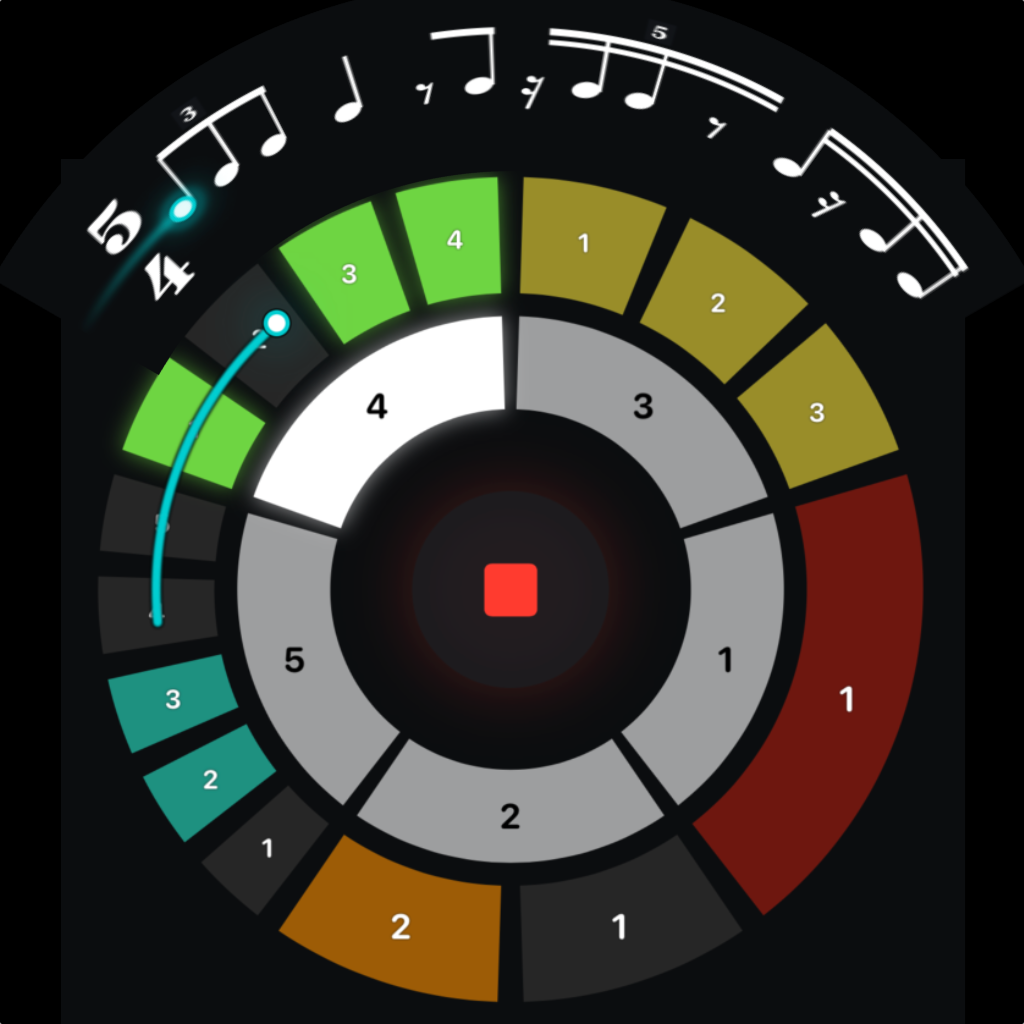
AllGoRhythmics shows each rhythm as a score in Bravura notation. Rests, beams, and tuplet brackets follow the pattern, while an animated comet playhead marks your place in the bar.
Build a rhythm by toggling beats on and off around the rotating dial. Drag the time signature to change meters on the fly. Tap-tempo a feel by hand. Save patterns into presets. Chain presets into playlists. Export what you make as MIDI for your DAW, or as audio for your phone.
Audio scheduling uses mach_absolute_time and AVAudioEngine.
How It Works
Set Your Time Signature
Drag the numerator up or down, or tap the denominator to choose 1, 2, 4, 8, or 16. Build any meter you need — 4/4, 5/4, 7/8, 11/8, 13/16. The notation pane updates live with proper Bravura time signature digits.
Choose Your Subdivisions
Each beat can be subdivided independently — eighths, triplets, sixteenths, quintuplets, septuplets, anything up to 16 subdivisions per beat. The dial updates in real time with the right number of slices, and the notation engine groups beams and merges rests intelligently.
Toggle Beats On and Off
Tap any slice on the dial to silence that beat. The notation engine flips it to a rest in real time — and if multiple rests in a row can be merged into a single longer rest, they will be. Four sixteenth rests collapse into a quarter; three sixteenth rests become a dotted eighth.
Set the Tempo
Use the BPM stepper, the RPM stepper (rotations per minute, for a different feel), or tap-tempo a rhythm by hand and let the app calculate it. The comet playhead glides through the bar in time with the audio.
Save, Build a Playlist, Export
Save any pattern as a preset with a smart auto-name. Chain presets into a playlist for practice sessions or performance. Lock BPM across the playlist and the engine scales correctly when meters change. Export the active pattern as MIDI for your DAW, or as audio to share.
Get Help When You Need It
Tap the ? button to enter Help mode. The dial and notation pane each show a plain-English explanation of every control and what it does. No manual, no guesswork.
The Subdivision Color Code
Every subdivision count has its own color on the dial. As you change how many parts a beat is divided into, the slices recolor — so you can read the rhythmic density at a glance, before you even hear it. Here is the full map, from a single undivided beat (1) up to sixteen subdivisions per beat (16).
Key Features
Trainer Mode — Tap-Along Evaluation
Tap along to any rhythm. The app evaluates every tap against the beat with a tolerance you set (±30 to ±300 ms), shows green/red flash markers on screen in real time, and ends with a summary card: hits, misses, notes-played %, tap-precision %, and an average timing offset shown as "tapped late by N ms" or "tapped early by N ms". 1-measure silent count-in. Pick 1, 2, 4, 8, or ∞ cycles. Practice, evaluated.
Practice Log
Every Trainer session auto-saved. Aggregate header chips show total time practiced, total hits, and a 7-day rolling accuracy — so you can see your trend, not just one rep. Newest-first list with date, rhythm summary, and score badges. Tap a row for the full detail card; swipe to delete.
Beat-Focus Overlay
Tap any beat group in the notation. A zoomed subdivision editor opens over the dial, co-centered, showing just that beat as a big toggle ring. Tap a slice to flip it on or off. Tap-out or X to dismiss. Editing micro-detail without losing the overview.
Playlist Master Repeat Stepper
One stepper sets the repeat count on every playlist entry at once — ×N when all entries match, ×~ when they don't. Tap-to-type on every repeat number (per-entry and master). The bookkeeping of "play each thing four times" disappears.
Real Music Notation
Notes, rests, beams, flags, and tuplet brackets render with the Bravura font — the SMuFL standard used by professional engraving software. Standalone eighth notes get proper flags. Rests merge intelligently across the bar.
Eight Soundsets
Choose the voice of your click: Claps (Kick + Tambourine + Clap), Percussion, Marimba, Piano, E Piano, 808, Synth, or a clean Sine reference. Beat 1 layers a downbeat accent on top of the main beat for a fuller "1." Your choice is remembered between launches.
Animated Comet Playhead
A glowing comet glides across the notation in time with the audio, showing exactly where you are in the bar. Sample-accurate scheduling means the visual and the audio always agree.
Interactive Time Signatures
Drag the numerator up and down, or tap the denominator to switch through 1, 2, 4, 8, 16. Up to 32/16 in Pro. The notation pane reflows on the fly.
Tap Tempo
Tap a rhythm with your finger and the app figures out the tempo. Useful when you know the feel but not the BPM.
Random & Custom Random
Tap the first dice to shuffle the notes — it keeps your subdivision structure and just re-rolls which notes play, for a new groove on the same grid. Tap RANDOMIZE (the second dice) for a completely fresh pattern, with new subdivisions on every beat. Tap RANDOMIZE TS for a fresh time signature. Long-press RANDOMIZE to choose exactly which subdivision values to draw from — 1, 2, 4, 7 or 3-5 or any mix.
Presets & Playlists
Save any pattern as a preset with a smart auto-name. Chain presets into a playlist with per-entry repeat counts. Lock BPM or RPM across the playlist for steady practice.
Search, Sort & Favorites
Find any preset instantly by name. Sort the library alphabetically, by date saved, or by BPM. Star your favourites — they pin to the top so the patterns you actually use are always one tap away.
Multi-Select & Batch Editing
Long-press to enter select mode. Pick any number of presets and act on them all at once: set a common BPM, set a common RPM, add to a playlist, export, or delete. The kind of operation a serious practice library actually needs.
Import & Export Presets
Export selected presets as a single .agrpresets file via the share sheet — send a study set to a student, save a backup, share a configuration with a collaborator. Tap a received file to import it back into your library.
Duplicate & Reorder
Swipe right on a preset or playlist to load or duplicate it. Drag handles to reorder manually, or auto-sort alphabetically or by date. Deleting a preset warns you if it would leave a playlist completely empty and cleans up after itself.
Three Playback Modes
Sequential plays in order. Shuffle Once randomizes one pass. Shuffle Always re-randomizes every loop. Pair with Loop mode for endless practice or set a global play count for fixed sessions.
Binary Rhythms Generator
Generate every 2ⁿ on/off permutation as a playlist instantly. Pick subdivisions (1-9) and denominator. From Bin 4/4 0000 through Bin 4/4 1111, every binary rhythm one tap away — a serious systematic practice tool.
Live Edit Override
While a playlist is playing, tweak any preset live — the changes stick on the next loop. Save them, save as a new preset, or discard. The playlist doesn't kick you out the moment you touch something.
MIDI Export
Export the current pattern as a Standard MIDI File. Drag it into Logic, Ableton, GarageBand, Pro Tools, Cubase, or any DAW that accepts MIDI. Use it as a click track or as the seed for a real arrangement.
Audio Export
Export your pattern as a 44.1 kHz audio file, rendered with your selected soundset so it sounds exactly like the app. Choose Full Metronome (downbeat, main beats, and subdivisions, layered) or Pattern Only (just the rhythm in a single voice — drop it in a DAW and add your own click). Use it as a click track, layer it, or send it to a student.
iCloud Sync
Pro adds iCloud sync. Your presets and playlists follow you across iPhone, iPad, and Mac.
Background Audio
Lock your phone, switch apps, take a call — the click keeps going. Audio interruptions are handled gracefully and playback resumes when the call ends.
Haptic Feedback
Optional vibration on each enabled subdivision (iPhone only). Useful for silent practice, hearing-impaired musicians, or feeling the pulse without sound. Default off — toggle from the main view.
Dark Interface
Designed for dark mode from the ground up. Easy on the eyes in a practice room or studio with the lights down.
New in Version 1.2
Version 1.2 brings tuplets to both the dial and the staff — the deepest expression of the idea above — plus an aksak-meter generator and a playlist upgrade. Divide a beat by any number; divide one of those again.
X:Y Tuplets New
Author any tuplet — 5:2, 7:3, and beyond — on the dial or with a dedicated picker, engraved on the staff with a proper italic ratio and bracket. Because on the dial, dividing by five is the same move as dividing by two.
Nested Tuplets New
Divide a tuplet again — a tuplet inside a tuplet. The dial renders the nested group; the staff engraves a smaller bracket inside the outer one. The present is divisible without end.
Additive (Aksak) Meter Division New
The AMD generator builds every way to group a bar into 2s and 3s — aksak meters — on a clean dotted grid at a steady pulse you choose. A serious tool for odd-meter practice, generated as a ready-to-play playlist.
Shareable Playlists New
Sort your playlists, Select-All when adding presets, and export or import a whole playlist as a single file — over AirDrop, Messages, or Files. Practice sets move between devices.
Who It's For
Drummers & Percussionists
Working through Stick Control or Syncopation. AllGoRhythmics turns the exercises in the book into living patterns you can hear, see notated, and loop at any tempo.
Jazz Students
Learning to feel odd meters. Set 7/8, 11/8, 13/16. Hear it. See it written. Loop it until it's in your hands.
Composers & Arrangers
Sketching rhythmic ideas. Build a pattern, hear how it feels, export it as MIDI, drop it into your DAW. Skip the click-track gymnastics.
Music Educators
Presenting rhythm concepts in class. The notation pane projects beautifully — students see exactly what they're hearing. Build the pattern in front of them.
Free, with One Optional Upgrade
AllGoRhythmics is free to download with full notation rendering, audio playback, and the comet playhead. Save up to 5 presets, build 1 playlist with 5 entries, and export 5 MIDI plus 5 audio files lifetime — enough to genuinely use the app, not just preview it. When you need more, unlock Pro once and own it forever.
Free
- All notation rendering, comet playhead, audio
- Trainer mode — full tap-along evaluation
- Practice Log — unlimited session history
- Beat-focus overlay, master repeat stepper, tap-to-type everywhere
- Time signatures up to 5, denominators 1-16
- Subdivisions per beat up to 5
- Tap tempo, beat enable/disable, drag-to-edit
- Search, sort, favourites, duplicate, reorder
- 5 presets
- 2 playlists with up to 5 entries each
- 5 preset exports + 5 batch edits lifetime
- 5 MIDI exports + 5 audio exports lifetime
- 2 Binary Rhythms generations lifetime
- 2 Additive (Aksak) Meter Division generations lifetime
Pro Unlock
- Time signatures up to 32 (5/4, 7/8, 11/8, 13/16…)
- Subdivisions up to 16 (quintuplets, sextuplets, septuplets…)
- Complex X:Y tuplets — X or Y above 5 (7:3, 9:4, 11:8…)
- Unlimited presets & playlists
- Unlimited batch BPM/RPM editing
- Unlimited preset import & export (
.agrpresets) - Unlimited Binary Rhythms generations
- Unlimited Additive (Aksak) Meter Division generations
- Playlist export & import (
.agrplaylist) - Unlimited MIDI & audio export
- iCloud sync — your library on every device
- Restore on any Apple device with your Apple ID
One purchase. Forever. No subscription. The metronome category has been sliding toward monthly subscriptions for cloud sync and basic features. We don't believe in that. Buy AllGoRhythmics Pro once, use it for years, restore it on every device you own.
Built by One Developer
AllGoRhythmics is built by Çağlayan Yıldız at Puja Music Productions in Antalya, Turkey — alongside MathRonome (polyrhythmic metronome), Elvin's Numbers (children's number learning), and Aquadrum Pro (tongue drum companion).
One developer. No ads. No tracking. No third-party SDKs. No data collection of any kind. You buy it once, you own it forever — and your patterns stay on your device unless you choose to enable iCloud sync.
Frequently Asked Questions
Both. It's a metronome that shows you what you're playing in real Music notation, and a notation tool that plays itself. The two are inseparable in this app — every pattern is simultaneously a sound and a score.
Bravura is a free, open-source Music notation font developed by Steinberg as the reference implementation of the SMuFL (Standard Music Font Layout) specification. It's the default Music font in professional software like Dorico, and is bundled as the fallback font in MuseScore. AllGoRhythmics renders all notation symbols — notes, rests, beams, flags, time signature digits, tuplet brackets — using Bravura glyphs.
Eight soundsets, chosen from the Sounds menu: Claps (Kick + Tambourine + Clap), Percussion, Marimba, Piano, E Piano, 808, Synth, and a clean Sine reference. Beat 1 layers a downbeat accent on top of the main beat for a fuller "1." Your choice is remembered between launches.
Yes — as of v1.2, tuplets (5:2, 7:3, …) and nested tuplets — a tuplet inside a tuplet — render on both the dial and the staff, with proper italic ratios and brackets. Plus straight subdivisions up to 16 per beat, and an aksak / additive-meter generator for odd meters.
MathRonome is a polyrhythmic metronome — two independent rhythm layers overlaid as concentric rings, ideal for cross-rhythm practice. AllGoRhythmics is a single-layer notation-first metronome — the focus is on seeing rhythms written in real Music notation as you build them, with MIDI/audio export and full preset/playlist management. Different tools for different practice modes.
AllGoRhythmics requires iOS 17.0 or later, iPadOS 17.0 or later. It also runs on Apple Silicon Macs (M1 and later) via the "Designed for iPad" path — same app, same iCloud library, in a Mac window.
No. There's no signup, no account creation, no analytics, no third-party SDKs, no advertising — nothing. Your presets and playlists are stored locally on your device. If you turn on iCloud sync (Pro feature), your data goes through Apple's iCloud, which is private to your Apple ID — we never see it.
Yes. The MIDI export produces a Standard MIDI File you can drag into Logic, Ableton, GarageBand, Pro Tools, Cubase, Studio One, Reaper, or any DAW that accepts MIDI. The audio export produces a 44.1 kHz file you can share or import directly.
Many numeric controls use AGR's on-screen numpad. Tap the displayed value, enter a number, then tap ✓ to confirm; tap Cancel to leave it unchanged. Use the decimal key for RPM, and the comma and minus keys for list or range fields. This includes RPM, BPM, and subdivision values; time-signature numerators; tuplet X/Y; Trainer tolerance; playlist and preset repeat, locked-tempo, and batch values; and generator fields such as AMD, Ramp, Cells, Structures, Swing, Binary, and Randomize pools. The time-signature denominator remains the dedicated 1, 2, 4, 8, 16 choice grid, and Trainer cycles remain the quick 1, 2, 4, 8, and ∞ choices. Sliders, wheels, and +/- buttons remain available where shown.
No. It's a one-time purchase of $3.99. You own it forever. It restores on every device signed into your Apple ID via the "Restore Purchases" button inside the app's paywall.
Email support@pujamusic.com — we read everything and respond personally.